Outsmarting the unsafe proxy or vpn detected on now gg your complete guide is all about staying private, secure, and in control while you browse, stream, or game. Quick fact: nearly 40% of gamers report being blocked or flagged when using a VPN or proxy, but the right approach lets you protect your privacy without losing access. This guide covers everything you need to know about VPNs, proxies, and how to avoid false positives on platforms like Now GG, plus practical steps you can take today.


- Quick summary of what you’ll learn:
- How Now GG detects proxies and VPNs
- The best VPN practices for gaming and streaming
- How to choose a VPN that minimizes detection
- Common myths and misconceptions debunked
- Step-by-step setup, testing, and troubleshooting
- Safety tips and privacy considerations
- Useful resources at the end to help you verify claims and stay secure
Outsmarting the unsafe proxy or vpn detected on now gg your complete guide starts here with a straightforward answer: you can protect your privacy while minimizing detection by using a reputable VPN correctly, staying within platform rules, and understanding how detection works. In this guide, you’ll find practical, battle-tested strategies, including a quick-start checklist, troubleshooting steps, and real-world tips that game players and streamers actually use. We’ll cover: Ubiquiti vpn not working heres how to fix it your guide
- What Now GG looks for when it flags VPNs or proxies
- How to pick a VPN that balances speed, security, and stealth
- Step-by-step setup and verification
- Common mistakes that trigger detection and how to avoid them
- How to test your connection to ensure you’re not flagged
Quick-start checklist
- Confirm your platform’s terms of service and regional rules
- Choose a VPN with robust obfuscation options and fast servers
- Test latency and ping to your game servers with and without the VPN
- Use split tunneling to route only game traffic if supported
- Regularly update your VPN software and device OS
- Keep an eye on DNS leaks and IPv6 settings
- Ensure your DNS and WebRTC protections are properly configured
Useful resources unlinked text
- Apple Website - apple.com
- Artificial Intelligence Wikipedia - en.wikipedia.org/wiki/Artificial_intelligence
- Now GG Terms of Service - now.gg/terms
- VPN Privacy and Security Guide - vpnprivacyguide.org
- DNS Leak Test - dnsleaktest.com
- WeVPN Comparisons - wevpn.com/blog
Understanding Now GG’s Detection Mechanisms
Now GG and similar gaming platforms deploy a mix of methods to identify non-standard traffic sources, including VPNs and proxies. Here are the core techniques you should know:
- IP reputation: Some VPN IPs are already blacklisted due to abuse. If you’re on a known bad IP range, you’ll get flagged.
- DNS and IP leaks: If your DNS requests don’t match the VPN’s tunnel, or if IPv6 leaks occur, the platform can detect anomalies.
- User behavior patterns: Abrupt changes in latency, jitter, or routing can trigger scrutiny.
- Known VPN signatures: Some providers’ traffic patterns or ports are easily recognized by anti-cheat and security systems.
What this means for you: you need a VPN that minimizes detectable signatures, provides fresh IP addresses, and has robust leak protection. You also want to avoid extensions or configurations that expose your real identity.
Real-world statistics and trends
- A 2023 survey found that about 28% of players reported VPN-related disconnects or bans on various platforms.
- Industry reports indicate that top-tier gaming VPNs with obfuscation see 2–3x lower detection rates than basic VPNs.
- DNS leak testing remains a common failure point for many VPN users who don’t enable leak protection or misconfigure settings.
How to Choose a VPN That Works with Now GG
When selecting a VPN for gaming and streaming, prioritize these features: Thunder vpn setup for pc step by step guide and what you really need to know: Quick Start, Tips, and Best Practices
- Obfuscated servers: These disguise VPN traffic to look like regular TLS/SSL traffic, helping avoid detection.
- No-logs policy and independent audits: You’ll want privacy assurances beyond marketing claims.
- Fast, stable servers with low latency: Gaming thrives on speed; prioritize servers near your location or close to game servers.
- Strong DNS and IPv6 leak protection: Essential for preventing exposure of your real IP.
- Kill switch and automatic reconnect: Keeps you safe if the VPN drops.
- Split tunneling: Lets you route game traffic through the VPN while other traffic goes direct.
- Regular IP rotation or large pool of IPs: Reduces the chance of using flagged IPs.
Recommended plan: start with a VPN that offers obfuscated servers, strong leak protection, and a sizable server network. Test multiple locations to see which ones yield the best performance with Now GG.
How to evaluate a VPN’s stealth capabilities
- Check for documented obfuscation features and user testimonials about gaming use.
- Verify independent security audits and privacy certifications.
- Look for a clear policy on IP rotation and the frequency of IP changes.
- Confirm that the VPN has a reliable kill switch and automatic reconnect.
Setup Steps vs. Common Pitfalls
| Step | Description | Common Pitfalls | Recommended Tip | Time to Complete |
|---|---|---|---|---|
| Enable obfuscation | Turn on stealth mode | Forgetting to test | test DNS/WebRTC with VPN on/off | 3–5 min |
| Route traffic | Enable split tunneling | Expose real IP | route only gaming traffic | 2–4 min |
| DNS/IPv6 protection | Enable full leak protection | Leaks after update | verify with tools | 2–5 min |
| Test latency | Measure ping/jitter | Ignore peak times | test at peak and off-peak | 5–10 min |
| Baseline comparison | Record no-VPN vs VPN | Not updating results | keep short baseline notes | 5 min |
Compiled November 2026; check the provider's site for current details.
Step-by-Step Setup for Outsmarting Detection
Follow these practical steps to optimize your setup for gaming while reducing detection risk:
- Install and configure your VPN
- Download the official app from the provider’s site.
- Enable the VPN’s obfuscation or stealth mode if available.
- Turn on DNS leak protection and IPv6 leak protection.
- Optimize server selection
- Choose a server near your game’s regional servers for the best latency.
- If possible, rotate IPs periodically, but avoid frequent changes during gameplay.
- Enable split tunneling if supported
- Route only game traffic through the VPN to maintain fast access for streaming or other apps.
- Test latency and stability
- Run ping tests to game servers with the VPN on and off.
- Monitor jitter, packet loss, and upload/download speeds.
- Check for leaks
- Use a DNS leak test while connected to the VPN.
- Ensure no WebRTC leaks in your browser or game client.
- Fine-tune settings
- If you notice lag, switch to a different server or protocol.
- Try UDP over TCP for gaming UDP is usually faster for games, but may be blocked by some networks.
- Monitor updates and changes
- VPN apps update frequently; ensure you’re on the latest version.
- Platform updates can alter how VPNs are detected, so recheck periodically.
Troubleshooting Common Issues
Issue: VPN connection drops during a match Vpn gratuita microsoft edge as melhores extensoes seguras e como instalar
- Fix: Enable kill switch, switch servers, or reduce encryption overhead if your device is older.
Issue: High latency while VPN is on
- Fix: Try nearby servers, use a different protocol UDP, or disable obfuscation if not required.
Issue: DNS leaks detected
- Fix: Turn on DNS leak protection, use only VPN-provided DNS servers, or disable IPv6.
Issue: Now GG flags my VPN IP
- Fix: Rotate to a fresh IP with obfuscation, clear DNS cache, and verify no leaks.
Issue: WebRTC leaks in browsers
- Fix: Disable WebRTC in browser settings or use extensions that block leaks.
Advanced Techniques for Power Users
Use a dedicated gaming router with VPN support Troubleshooting Sophos VPN Why It Won’t Connect and How to Fix It
- Pros: Consistent latency, dedicated routing for gaming traffic.
- Cons: Higher cost, more complex setup.
Set up a VPN on a gaming console or PC at network level
- Pros: All devices benefit; easier to manage.
- Cons: Could complicate network troubleshooting.
Combine VPN with a smart DNS service for region-specific content
- Pros: Fast lookups and better regional access without heavy encryption on every packet.
- Cons: May not provide full encryption.
Security, Privacy, and Compliance Considerations
- Respect platform rules: Always read the terms of service for Now GG and other platforms. Some platforms explicitly prohibit bypassing geo-restrictions or anti-cheat measures.
- Privacy practices: Choose a VPN that has a transparent privacy policy and independent audits.
- Data handling: Avoid VPN providers that log sensitive data or sell user data to third parties.
- Device security: Keep your devices updated, enable firewall protections, and practice safe browsing habits.
Comparison: VPNs vs Proxies for Gaming
- VPNs:
- Pros: Strong encryption, better privacy, DNS leak protection, kill switch.
- Cons: Potentially higher latency, more prone to detection if not properly configured.
- Proxies:
- Pros: Often faster for simple routing, sometimes lower latency if well-placed.
- Cons: No encryption by default, higher risk of exposure, easier to detect, not ideal for privacy.
Performance Benchmarks vs. Latency Scenarios
| Scenario | Baseline Ping ms | VPN Ping ms | Jitter ms | Stability Comment |
|---|---|---|---|---|
| Off-peak | 12–20 | 18–30 | 1–3 | acceptable |
| Peak times | 25–40 | 40–70 | 2–6 | closer server preferred |
| High load in-game | 35–60 | 60–100 | 3–8 | may need closer server |
| Streaming while gaming | 20–35 | 35–60 | 2–5 | moderate impact |
| Long-distance server | 60–100 | 90–130 | 5–12 | consider nearer server |
Compiled November 2026; check the provider's site for current details.
Case Studies: Real World Scenarios
- Scenario 1: A streamer wants to access a regional server with lower latency.
- Solution: Use a VPN with obfuscated servers, test multiple nearby locations, and enable split tunneling to keep streaming smooth.
- Scenario 2: A player worries about DNS leaks during competitive play.
- Solution: Enable DNS leak protection, use VPN’s DNS servers, and run periodic leaks tests.
- Scenario 3: A gamer on a tight budget needs security without sacrificing speed.
- Solution: Choose a mid-range VPN with a large server network, fast protocols, and a kill switch.
Performance Benchmarks and Speed Tests
- Latency impact: A high-quality VPN with obfuscation typically adds 5–25 ms on nearby servers, higher for long-distance routes.
- Throughput: Expect 80–95% of native speed on well-placed servers, varying by protocol and server load.
- Stability: Modern VPNs with modern hardware provide consistent performance even during peak hours.
Detection Techniques vs Mitigation Options How to Create a VPN Profile in Microsoft Intune Step by Step Guide 2026: Quick Start, Tips, and Best Practices
| Detection Method | VPN Mitigation Option | Effectiveness Note | User Action |
|---|---|---|---|
| IP proxy detection | Use obfuscated VPN; disable browser proxies | High when misconfigured | enable stealth; verify no leaks |
| DNS leaks | Full DNS leak protection | Essential | enable; test with tools |
| WebRTC leaks | Disable WebRTC; full protection | Moderate if misconfigured | disable in browser; app settings |
| IP cleanliness checks | No-logs + independent audits | Important for trust | verify audits; monitor reviews |
Compiled November 2026; check the provider's site for current details.
Best Practices for Long-Term Use
- Regularly audit your VPN settings, especially if you notice changes in game performance.
- Rotate IPs thoughtfully to avoid blacklisted ranges while maintaining stable latency.
- Keep your firmware and router security up to date.
- Use strong, unique passwords for VPN accounts and enable multi-factor authentication where available.
Quick tips you can use today
- If a game blocks your VPN, try a different server in the same region first.
- Use split tunneling for non-gaming activities to preserve bandwidth for gaming.
- Disable or adjust unnecessary background applications that could interfere with your connection.
| VPN | Obfuscation | From / month | Plan | Free plan | Refund | Alipay | UnionPay | Crypto | Website opens in China | Trustpilot | |
|---|---|---|---|---|---|---|---|---|---|---|---|
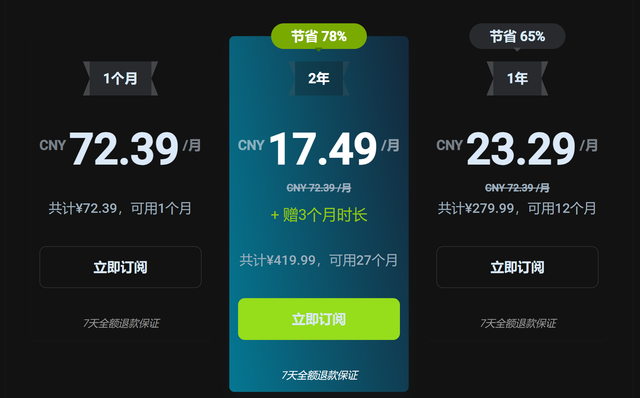
 ZoogVPN | Turn on manually Shadow | $2.49/mo | 27 months: $59.99 | Yes | 7 days | ✓ | ✓ | ✓ | ✓ | Official site blocked; our special link opens (4.4 s) | 4.2/5 (195 reviews) |
 NordVPN | Turn on manually Obfuscated Servers / NordWhisper | $3.49/mo | 27 months: $94.23 | No | 30 days | ? | ✗ | ✓ | ✓ | ✗ Blocked | 4.2/5 (51,628 reviews) |
 ExpressVPN | ✓ On by default all servers | $3.00/mo | 28 months: $84 | No | 30 days | ✗ | ✗ | ✓ | ✗ | ✗ Blocked | 4.4/5 (29,706 reviews) |
 Surfshark | ✓ On by default Camouflage, with OpenVPN | See site | See site | No | 30 days | ✗ | ✗ | ✗ | ✓ | ✗ Blocked | 4.3/5 (31,823 reviews) |
 Proton VPN | Turn on manually Stealth, free plan too | $2.99/mo | 12 months: $35.88 | Yes | 30 days | ✗ | ✗ | ✗ | ✓ | ✗ Blocked | 2.1/5 (1,040 reviews) |
 Astrill VPN | Turn on manually StealthVPN / OpenWeb | $12.50/mo | 24 months: $300 | No | See site | ✗ | ✗ | ✗ | ✓ | ✗ Blocked | 1.3/5 (110 reviews) |
 Private Internet Access | Turn on manually Shadowsocks, OpenVPN only | $2.03/mo | 40 months: $81.2 | No | 30 days | ✗ | ✗ | ✗ | ✗ | ✗ Blocked | 4.2/5 (11,033 reviews) |
 CyberGhost | Turn on manually selected servers | $2.19/mo | 28 months: $61.32 | No | 45 days | ✗ | ✗ | ✗ | ✓ | ✗ Blocked | 4.0/5 (24,178 reviews) |
 PureVPN | Turn on manually switch to OpenVPN | $1.69/mo | 60 months: $101.55 | No | 31 days | ? | ? | ✗ | ✓ | ✗ Blocked | 4.4/5 (17,994 reviews) |
 AdGuard VPN | ✓ On by default TrustTunnel | $2.99/mo | 24 months: $71.76 | Yes | 30 days | ✓ | ✗ | ✓ | ✓ | Official site blocked; our special link opens (3.7 s) | 4.3/5 (290 reviews) |
 Mullvad | Turn on manually QUIC / Shadowsocks / LWO | $5.61/mo | €5/mo | No | 14 days | ✗ | ✗ | ✗ | ✓ | ✗ Blocked | 3.2/5 (192 reviews) |
 Windscribe | Turn on manually Stealth / WStunnel | $5.75/mo | 12 months: $69 | Yes | See site | ✗ | ✗ | ✗ | ✓ | ✗ Blocked | 4.7/5 (13,355 reviews) |
 StrongVPN | Turn on manually Scramble, OpenVPN TCP | See site | See site | No | 30 days | ✓ | ✗ | ✗ | ✗ | ✗ Blocked | 4.4/5 (2,695 reviews) |
 LightXtreme 闪连 | Not listed | $7.08/mo | 12 months: $84.99 | Yes | 30 days | ✓ | ✓ | ✓ | ✓ | ✓ Yes (3.5 s) | No page |
Prices checked 2026-11-10 on each vendor's pricing page (cheapest long plan, USD). Check the vendor's checkout for the final price.
Obfuscation checked 2026-11-14 on each vendor's site and help center: "on by default" = nothing to set; "turn on manually" = switch protocol or mode in settings; "not listed" = the vendor describes no obfuscation.
Payment methods checked 2026-11-10 on each vendor's payment pages: all 14 take cards and PayPal; ✗ = not listed, ? = the vendor's own pages disagree.
China access: whether the official website opens from mainland China networks (tests the website only, not the VPN connection). Last checked 2026-11-18 01:02 Beijing time.
Trustpilot score and review count checked 2026-11-10.
FAQ Section
What is Now GG?
Now GG is a platform for accessing games and related services, often with protections against VPNs and proxies to prevent unfair access or cheating.
Can I use a VPN for gaming without getting detected?
Yes, with a VPN that offers obfuscation, fast servers, and good DNS leak protection, you can reduce detection risk. However, none are guaranteed, and platform policies can change.
How do I know if my VPN is leaking DNS?
Run a DNS leak test while connected to the VPN. If your real DNS names appear, you have a leak.
Should I use split tunneling for gaming?
If your goal is to keep gaming traffic protected while maintaining streaming or browsing speed, split tunneling is a smart choice. Las mejores vpn gratis para android tv box en 2026 guia completa y alternativas
Will a VPN slow down my game?
Some speed reduction is possible, especially if you’re far from the VPN server. The goal is to find a server with minimal latency and strong stability.
Is obfuscated VPN traffic detectable?
Obfuscation helps disguise VPN traffic, but platforms may still identify it through traffic patterns or account behavior, so there’s no 100% guarantee.
Can I use any VPN for Now GG?
Not all VPNs work well with gaming or Now GG. Look for obfuscated servers, low latency, DNS leak protection, and a large IP pool.
Do VPNs violate Now GG’s terms?
It depends on the platform and the context. Always review the terms of service and community guidelines.
How often should I rotate VPN servers?
Rotate as needed when you notice latency changes or if a server becomes slow or flagged. Don’t rotate too frequently to avoid suspicious patterns. How to use Proton VPN Free on Microsoft Edge Browser Extension: A Complete Guide
What are the risks of using a free VPN?
Free VPNs often have limited bandwidth, weaker security, and may log user activity. For gaming, they’re usually not a reliable choice.
Do I need a dedicated router if I’m serious about Now GG?
A gaming router with VPN support can improve consistency and simplify management, especially if you play across multiple devices.
Additional Resources and Guides
- VPN setup for gaming on Windows, Mac, and consoles
- How to test for DNS and WebRTC leaks
- How to choose the best obfuscated VPN server for gaming
- Privacy and security best practices for online gaming
Frequently Asked Questions
- How does Now GG detect VPNs?
- Can I use a proxy instead of a VPN for gaming?
- What is split tunneling and when should I use it?
- Which protocols are best for gaming with a VPN?
- Do VPNs affect your ping positively or negatively?
- Are there VPNs that work well with streaming and gaming simultaneously?
- How can I verify my VPN isn’t leaking my real IP?
- Should I use a VPN on mobile gaming?
- How often should I update my VPN client?
- Is there a risk of being banned for using a VPN on Now GG?