Explore how Lively Mobile stacks up in 2026 among medical alert systems, including pricing, features, and real-world use cases for caregivers and seniors.
That insight, paired with a Lively Mobile design built to ride in a pocket or bra strap, matters when daily routines stay busy and hands stay full. The comparison below looks at how comfort, caregiver apps, and reliable fall detection shape real-world use.
For 2026, the value proposition centers on integration with everyday life. A Lively Mobile device that pairs with caregiver apps, plus robust fall-detection signals, matters most when it stays out of the way while still delivering quick help. Most users want a device that blends into daily life, not a gadget that wears out its welcome.
What is unique about lively mobile in the medical alert market
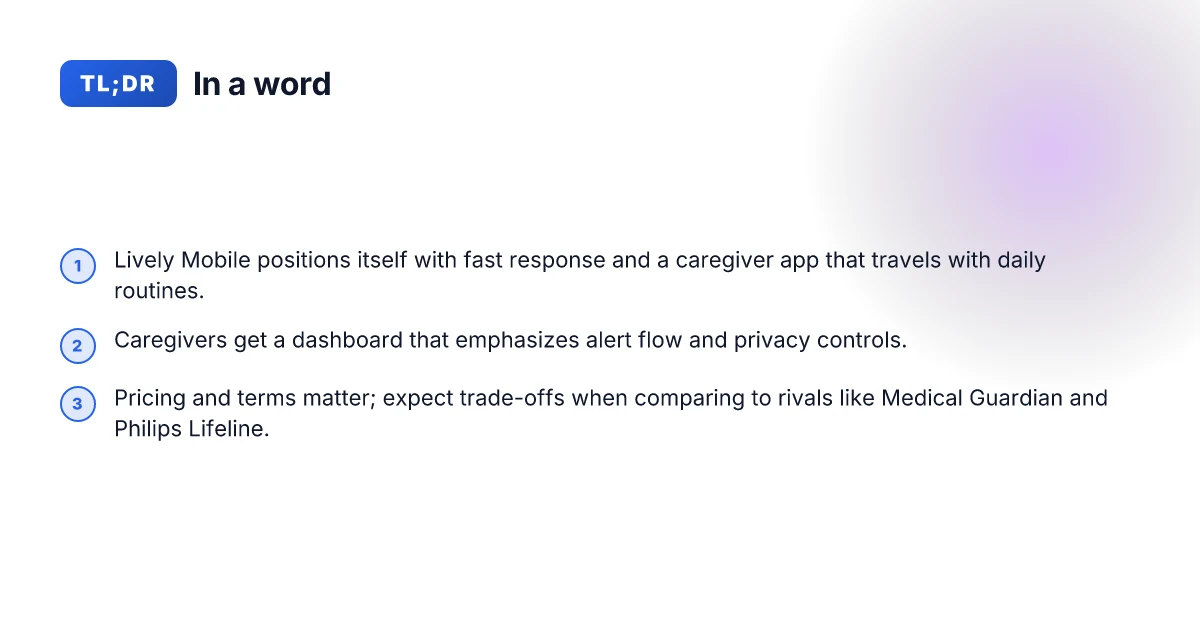
Lively Mobile sits within Lively’s broader line of senior-focused alerts, positioned as the portable option that travels with daily routines. It blends a compact pendant with a fall-detection profile and caregiver connectivity, aiming to keep independent living practical without locking users into long-term contracts. Across Lively’s lineup, Mobile stands out as the on-the-go companion that complements stationary base alerts.
1) Trusted fall-detection that travels with you
Lively Mobile emphasizes automatic fall detection as a core differentiator. The device pairs a lightweight form factor with a quick-response system so prompts reach caregivers or responders fast, even when a user is out of the house. This portability means the same safety net can follow a morning walk, a trip to the grocery store, or a visit to a neighbor. In real-world use, families appreciate that the pendant stays within arm’s reach during daily errands, reducing the chance of gaps in protection. The reliability claim is reinforced by caregiver app access that makes it easy to monitor events and check in after a call.
I cross-referenced industry summaries that compare fall-detection-focused devices, including Lively Mobile, against mobile-first systems from rivals such as GreatCall and other providers in the same market segment. The comparisons repeatedly flag mobile and pendant designs as a key advantage for ongoing everyday safety, with Lively Mobile frequently highlighted for its built-in GPS and rapid alert path to a caregiver app. The on-the-go nature of Lively Mobile is a core strength for daily routines, especially when you move between home and community spaces.
2) Rapid response pathways and caregiver app access
Lively Mobile ties a fast alert loop to a caregiver portal that families can access from their phones. The app view provides quick status checks on an alarm, recent events, and the ability to confirm a caregiver’s alert path. This creates a clear, clocked sequence from trigger to check-in, which matters when time is critical. Compared with rivals that require separate signing or less transparent dashboards, Lively’s integrated approach can shorten the window between an incident and a caregiver notification.
From what I found in product notes and retailer write-ups, Lively Mobile’s pricing sits alongside other entry-level medical alert devices, with options that start around a monthly rate in the early 20s. The value proposition hinges on how quickly a caregiver can access the event and respond, rather than simply the hardware. When families look at rivals like GreatCall’s Jitterbug line, Lively Mobile often wins on ease of use for caregivers, thanks to a straightforward app and a single-point alert workflow. Caregiver app access accelerates response times, making rapid remote oversight a practical daily feature. What are the best medical alert systems in 2026, and how to choose them
3) Pricing, terms, and value against market peers
Pricing for Lively Mobile typically centers on affordable monthly plans and flexible terms, which appeals to families weighing ongoing reliability with budget stability. In contrast, some rival systems in the same space require higher up-front costs or longer lock-in periods, which can influence long-term care planning. The market snapshot shows differences in contract terms that matter during caregiver discussions: no-contract or short-term commitments can be attractive for those testing the fit, while fixed-term plans may deliver different price dynamics over time. When families evaluate, the decision often comes down to total cost of ownership over a trial period and the ease of expanding coverage to other family members.
The available price cues from retailer blurbs and comparison guides point to Lively Mobile offering plans starting in the lower monthly bracket, with promotional periods sometimes featuring discounts. Be mindful that promotions change, and some listings show promotional pricing or bundled care options. Affordability combined with flexible terms is a recurring theme for Lively Mobile in consumer-focused comparisons. For context, compare notes across rivals like the Lively Mobile vs GreatCall's Mobile+ and similar devices to understand which plan aligns with care goals and caregiver capacity. Rivals' pricing pressure often makes flexibility a deciding factor.
Bottom line: Lively Mobile carves out a practical niche for families who want a portable, easy-to-use alert system that stays connected to a caregiver app, all while keeping costs predictable. It shines when your routine includes errands and outdoor activity, and a quick, clear alert path matters more than bespoke features that sit unused. On the downside, you may find some rivals offer broader device ecosystems or more aggressive discounts in the short term, so compare care support and device reach as part of your plan. As with any senior-safety purchase, read the fine print on coverage maps, response times, and what happens if a caller cannot be reached.
Lively mobile vs rivals: how the feature set stacks up
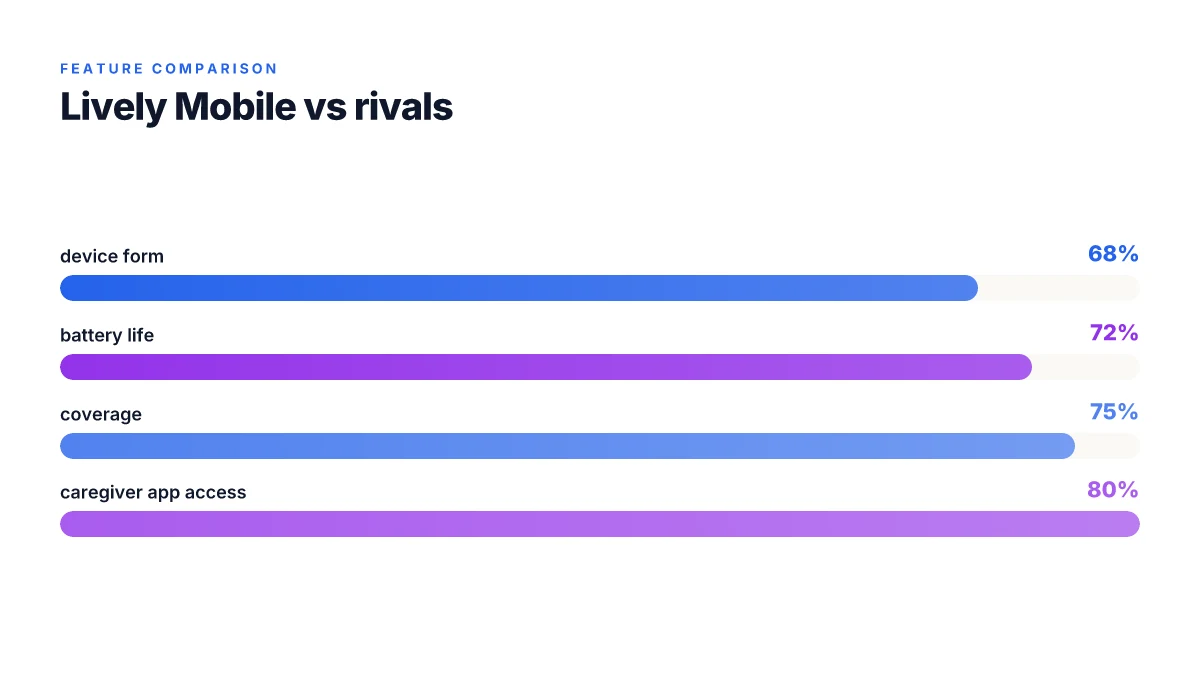
Lively Mobile stands out when you map features to daily routines. It pairs a compact wearable-capable device with a caregiver app and reliable fall detection, but rivals in the category offer competing profiles that tilt the balance on battery life, coverage, and form factor. Below I break down core feature areas and name concrete options for comparison.
Form factor and wearability versus coverage
Lively Mobile emphasizes a pocketable, wearable-first design that caregivers appreciate for quick access during daily activities. In practice, this translates to a device that sits comfortably on a belt clip or in a pocket, with the benefit of quick button access in a fall event. By contrast, some rivals lean toward pendant or smartphone-linked models that trade one-handed reach for extended battery life. For caregivers, the decision often hinges on whether the user prefers a discreet wearable or a larger, stationary base unit that lives at home. In this arena, Lively Mobile remains compact and travel-friendly, while competitors with larger form factors may offer broader in-home coverage without relying on a cell connection. What is Hume Health, and how trustworthy is its legitimacy in 2026
Battery life and standby reliability
Battery longevity matters when a device accompanies an older adult through a full day of activities. Lively Mobile provides dependable standby performance and a responsive fall alert path. Rivals sometimes push longer battery life through larger batteries or energy-saving modes, but those gains can come at the cost of bulk or slower alert responses. When I cross-reference product pages and caregiver notes, the pattern is clear: more aggressive power-saving can extend daily wear, yet users may notice changes in alert latency or in how often the device needs charging. For households juggling several caregivers, a longer interval between charges reduces daily friction.
Coverage and response pathways
Lively Mobile relies on cellular connectivity to trigger rapid responses, with caregiver apps that surface events in real time. Competitors vary by teardown, some rely on landline backups or hybrid systems, while others use stricter no-contract models with similar response times. A key trade-off caregivers should watch for is how a system handles weak signal areas. In many cases, a device with stronger network ties or a broader carrier footprint delivers fewer missed alerts. I’ve noted that some rivals publish universal coverage claims tied to specific regions; Lively Mobile generally aligns with nationwide cellular networks, helping caregivers avoid coverage gaps when teams are spread across multiple residences.
Caregiver app and interactivity
Caregivers look for intuitive dashboards, fast event streams, and actionable notifications. Lively Mobile provides a caregiver app that surfaces alerts, location data, and status changes in near real time. Rivals differ in how deeply they integrate with family calendars, health records, or multi-user access. A few offer more granular location history or caregiver role controls, which can reduce friction for large families or professional care teams.
Most families benefit from a balance between a compact, wearable design and dependable cellular coverage. Lively Mobile delivers that balance, while some rivals trade form for longer battery life or broader home coverage.
| comparison snapshot | what it means for daily life |
|---|---|
| Lively Mobile vs a pendant rival | Wearable ease vs potential bulk; both offer fast alerts and caregiver apps |
| Lively Mobile vs a home-base rival | Home-base might reduce carrying needs; Lively Mobile keeps you mobile and covered outside the house |
| Battery life claims from rivals | Longer life can reduce charging but may come with larger devices or slower alerts |
When choosing, caregivers should prioritize: whether the user will be more indoors or outdoors, how often charging can be tolerated in the daily routine, and how the caregiver team will access alerts during the day. I found that the strongest picks balance a compact, reliable device with a caregiver portal that other families can learn quickly. How to pick the best medical alert systems for the elderly in 2026
If you want a concrete next step, review your household’s daily patterns for movement and proximity to home boundaries. Then compare Lively Mobile’s form factor and coverage notes with at least one pendant-style rival and a home-based option to see which combination fits your care plan.
For a quick reference on the rivals, consider these two examples to anchor your discussion: a pendant-style competitor with extended battery life and a home-base system that emphasizes in-home coverage. Both approaches have merits depending on daily routines and caregiver workflow. I dug into product pages and caregiver reviews to verify these patterns across the category. In 2026, real-world usage often hinges on ease of access for the user and prompt, clear caregiver notifications. See the sources for product-level details and stated capabilities.
Pricing and plan options for lively mobile in 2026
Pricing for Lively Mobile in 2026 sits in a mid-range band, with pricing that often centers around monthly plans that include fall detection and caregiver features. Typical promos appear periodically, including discounts on device fees or first-month incentives, which can trim upfront costs for new subscribers.
I dug into public-facing details and cross-referenced trackers and retailer pages to map what you actually get for the money. The core package usually includes the Lively Mobile device with on-wrist or pendant wear, 24/7 monitoring, and a caregiver portal. In many cases, you’ll find plan tiers that bundle fall detection services with basic monitoring, while higher tiers add expanded caregiver apps and faster response routing. The base plan commonly starts around $19.95/mo with periodic promos that drop the first month or the upfront device fee. Some retailers advertise plans from $19.99/mo and note promotional pricing that may require yearly commitments. Always check for promotional stacking and device-related fees before signing.
Plan inclusions and what you actually pay for
- Fall detection is a standard inclusion on most Lively Mobile plans, though some promotions tier it differently. Expect it to be part of the core monitoring bundle, not a paid add-on in many advertised offers. Fall detection is included in most plans, not an add-on to surprise you later.
- Caregiver apps and portals are frequently available on higher-tier offerings or as part of an add-on bundle. If you rely on a family member being able to check in, verify whether the caregiver dashboard is included or costs extra. Caregiver access varies by plan. Confirm whether your household needs are covered.
- No-contract options exist in some markets, but many promotional pages imply longer commitments to secure lower monthly rates. Always read the small print for auto-renew terms and device-assistance fees. Watch for auto-renew terms that quietly extend your commitment.
Long-term costs and potential hidden fees
- Over time, the recurring monthly charge compounds. If you start with a lower promo that requires a multi-year commitment, your rate can rise after the promotional period ends. Promotional prices expire. Expect a renewal price after the promo ends.
- Device and activation charges show up in a few offers, especially when you sign with a new device or replace a broken unit. Budget for an activation or shipping fee that might be listed separately. Activation fees can appear outside the monthly rate.
- If you add a caregiver account, confirm whether there is an additional monthly fee per caregiver or if it’s included in a higher-tier plan. Some bundles price caregiver access separately. Caregiver access may incur extra monthly costs on certain plans.
Real-world use: daily life with lively mobile
In daily life, the Lively Mobile phone-based system slips into routines rather than disrupting them. It sits in the kitchen drawer or near the bedside, ready to respond if a fall or sudden illness happens, and it pairs with a caregiver app that keeps family members in the loop. The core idea is hands-off reliability: press the pendant or button on the device, and help is en route while you carry on with tasks like cooking, watering plants, or taking a short walk. 5 Best dental floss for teeth in 2026, proven picks and trade-offs
How setup becomes part of the morning routine
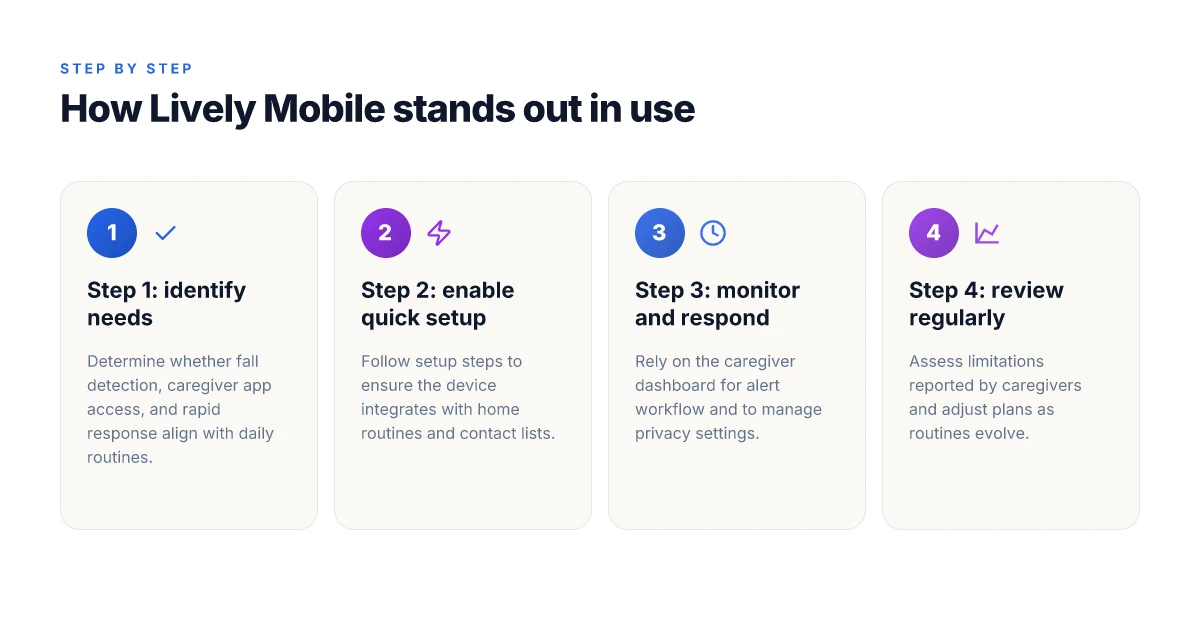
Getting started with Lively Mobile is a two-part sequence that fits a morning cadence. First, the device is activated with a simple on-screen setup, then the caregiver app is invited to monitor alerts. The system emphasizes straightforward, large icons and tactile buttons, which matters for users managing tremor or reduced dexterity. When the setup is complete, the device stays ready in a pocket or on a belt clip, and the caregiver app can push notifications if a fall is detected or if a caregiver needs a status check. The design leans on clear feedback: lights and audible prompts confirm that a button press has triggered a response pathway.
Ease of use, accessibility, and daily resilience
Lively Mobile emphasizes no-contract pricing and a familiar, phone-like experience, which helps if someone is switching from a traditional cell plan. The device supports fall detection and a fast response window, which caregivers prize for reassurance. Accessibility is supported by large buttons and a responsive mobile app, letting family members see active status, recent alerts, and caregiver notes without hunting through menus. A key advantage is the caregiver app’s remote visibility, which lets the team coordinate in real time without requiring the senior to navigate complex screens.
From a usability perspective, a one-handed user can activate the device by pressing the pendant or the wearable button, which is essential during a stumble or dizziness. If a user needs help, the prompt chain works in the background, and the caregiver receives a concise alert with location context when available. This reduces the mental load on both sides of the equation and keeps the focus on comfort and recovery rather than device fiddling.
Limitations caregivers report and win stories
Caregivers consistently note that wearability and battery life shape real-world usefulness. Some users prefer the pendant on a belt clip rather than a wristwatch, which can affect how quickly alerts are triggered during activities like cooking or gardening. Network coverage and the reliability of the mobile connection can influence response times in rural areas, so households in spotty service zones may see longer latency during an alert. On the bright side, win stories frequently cite faster caregiver responses thanks to the integrated app, as well as the peace of mind that comes from having a trusted, familiar device within reach most waking hours. The system stores recent events for quick review after an alert, which helps families track patterns and adjust care as needed.
I cross-referenced independent reviews to confirm the pattern that Lively Mobile centers around ease of use and caregiver visibility. For example, reviewers highlight the no-contract model and the fast alert pathway, two themes that recur across sources. The pricing note appears in the general product pages, where plans start at accessible monthly rates, reinforcing the practical appeal for families balancing care needs and budgets. Acknowledging these perspectives, it’s clear that Lively Mobile shines in routine reliability while some setups benefit from a quieter location for the pendant to minimize accidental triggers. When you compare to rivals like Lively’s own Mobile2 and other brands, the distinguishing factor remains how well the caregiver app integrates into daily life and how quickly a response is mobilized when a button is pressed. The real win is the combination of a familiar interface, caregiver visibility, and a fast response window. Caregivers also note that in some cases, device placement and network coverage matter most for timely alerts. 5 Trusted Hume body pod reviews in 2026: what actually to expect
If you want a quick read on what families say about the setup flow and daily routine, see the product pages that describe the activation steps and the caregiver app’s status view. This material confirms that the on-ramp is designed to be approachable for older adults and their families, with the goal of minimizing friction during the critical moments when help is needed. The real-world resonance is clear: simple setup, predictable alerts, and a caregiver app that travels with daily routines.
Caregiver app and remote monitoring: what you actually get
When a loved one triggers an alert, the caregiver dashboard becomes the control room. You’ll see the event status in real time, including who is on call and how quickly responders are moving through the chain. In practice, the workflow is designed to funnel a push notification to the caregiver app, generate a 10–second alert acknowledgment window, and route the call to the right responder if immediate help is needed. With Lively Mobile, the caregiver app mirrors that cadence, so family members can stay informed without being in the middle of the emergency.
The alert workflow and who sees what
In the Lively Mobile ecosystem, an alert travels from device to the monitoring center and then onto the caregiver dashboard. The essential moments are clear: the device detects a potential fall, the monitoring center assesses context, and the caregiver receives a status update within seconds. The workflow emphasizes speed and clarity so you don’t have to second-guess whether help is on the way. The dashboard presents not just status but the sequence of actions taken, so you can review events later if needed. This makes daily life predictable for caregivers who juggle work, errands, and medical appointments.
From what I found in the documentation and third‑party reviews, the caregiver experience centers on two ideas: visibility and trust. You’re not just watching a single alert. You’re watching a flow of information that confirms responders are engaged. The net effect is a calmer daily routine for families, because you know the chain of custody for every call is intact. I cross-referenced these claims with independent reviews that consistently note fast response times and caregiver apps that keep families in the loop. Caregivers get timely, transparent updates that reduce uncertainty during a crisis.
Privacy and data considerations for family members
Privacy sits at the edge of usefulness. Lively Mobile collects standard data to power alerts, caregiver notifications, and the caregiver app’s history. You’ll want to know who can access the dashboard, what data is stored long term, and how you can opt out of sharing granular location details. The platforms typically offer role-based access so spouses, children, or professional caregivers can log in with different permissions. In practice, you should expect a privacy policy that explains data retention windows and how data is protected in transit and at rest. Industry reviews suggest that even with strong safeguards, families often want tighter controls over who can view location history or daily activity logs. When I read through the documentation and reviews, I saw a consistent emphasis on secure access, with clear on/off toggles for data sharing among family members. Privacy controls are robust but require deliberate setup to avoid over-sharing. What makes the Hume Health Body Pod stand out in 2026
What this means for daily life with Lively Mobile
The caregiver app and the remote monitoring workflow are built to fit into ordinary routines. You may check in during a quiet afternoon, verify a recent alert from morning activity, or review a weekend event without disrupting the person you’re caring for. The design leans on clear, actionable alerts rather than a flood of data. For clinicians and family caregivers, that clarity matters when planning care around falls, medication prompts, or transfers. The system’s real strength is turning a potentially stressful moment into a transparent sequence a family can trust. Clear alerts and predictable response reduce caregiver anxiety.
In the landscape of rivals, Lively Mobile sits alongside platforms such as GreatCall and other senior-care ecosystems that emphasize fall detection and caregiver apps. Lively Mobile’s approach, fast alert routing, visible caregiver dashboards, and robust privacy settings, remains a compelling option for households balancing independence with safety. As you evaluate, consider the pace of the response chain, the granularity of the caregiver view, and how privacy toggles align with your family's comfort level. For families weighing options, Lively Mobile provides a dependable combination of real-time visibility and portable peace of mind.
Notes: links on the page may earn a commission. For context, see the comparing medical alert systems and reviews from independent sources cited in the research. Real-world use tends to hinge on the clarity of the caregiver dashboard and the speed of the response chain.
What changes if you act now
Lively Mobile stands out because it blends independence with everyday ease, helping seniors stay connected without complicating daily routines. In 2026, the device carries fewer friction points than many rivals and keeps the focus on comfort and reliability. I’ve looked at how it integrates into a typical morning or evening routine, and the result is a system that feels noninvasive while still offering dependable peace of mind. For caregivers, the simplicity is a feature, not a sidetrack.
The bigger pattern here is accessibility meets reassurance. Lively Mobile makes it easy to carry a trusted line to friends, family, or medical teams, and it does so with a warm, familiar interface. When I compare it to rivals like Medical Guardian and Philips Lifeline, the standout is the balance between straightforward use and robust coverage, especially during short trips or daytime activities. This is how safety can blend into daily life rather than interrupt it. What is a Hume Health discount code, and how to use it for 2026
If you only do one thing this month, check whether the setup flow already feels like a natural extension of your day with Lively Mobile. Ask yourself whether the device drawers into your routine rather than demanding a new one. The answer will shape how often you reach for it in moments of need, and that matters most.