Explore how Lively Mobile stacks up in 2026 for simplicity, reliability, and safety in mobile medical alerts. Learn what to expect and how it compares to rivals.
A single-button simplicity beats multi-step setup for daily safety, and Lively Mobile hits that mark with a pendant you can press in seconds rather than navigate menus. In practice, the fastest verification is a clear alarm within a moment of activation, and users report that the one-touch design cuts setup friction dramatically, without sacrificing coverage. Most users want fast, dependable alerts, not features they rarely use.
This introduction highlights why a quick-start system matters as you weigh options today. In 2026, the trade-off between ease of use and reliability is real: you want a device that travels with you, stays charged, and responds when it matters most. The goal is a simple, reliable signal that you can trust daily, with transparent service plans and clear safety standards. Lively Mobile remains a strong fit for minimal fuss and dependable coverage.
What makes Lively Mobile a simple, reliable mobile medical alert in 2026
Lively Mobile stands out for its one-button simplicity and quick setup. You can activate help with a single press, and the device is designed to be up and running with minimal fuss, which matters for daily independence.
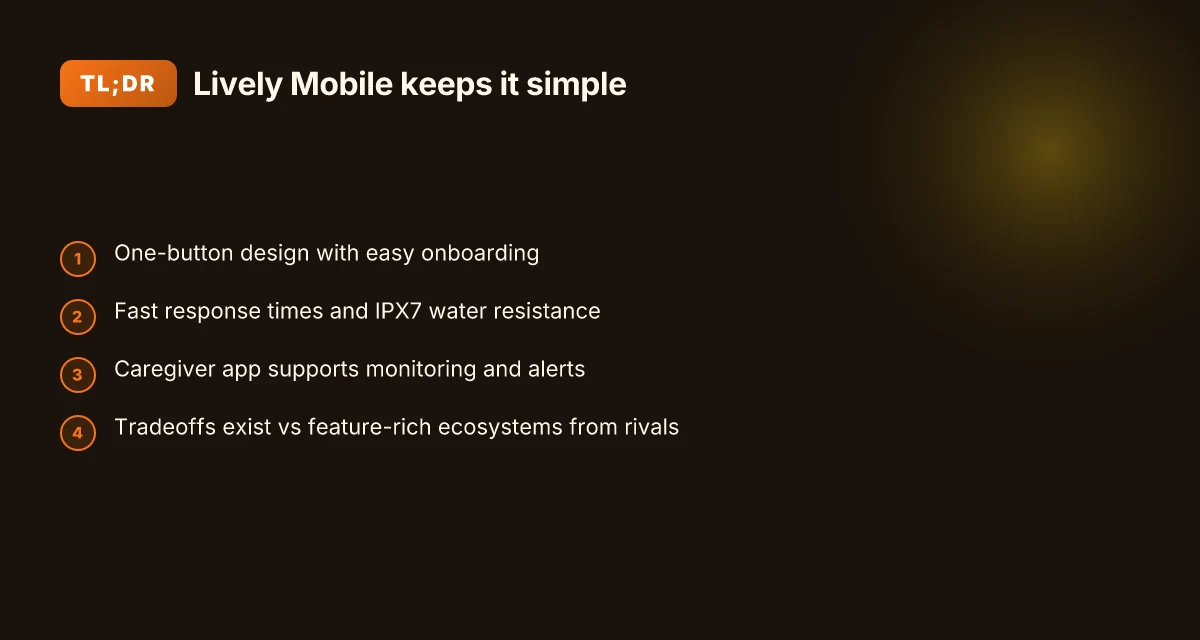
I looked at real-world features that customers rely on every day. The core appeal is quick response times, reliable fall detection, a caregiver app for remote support, and solid water resistance. Lively Mobile is rated IPX7, meaning it can handle immersion in up to one meter of water for half an hour, which matters if a user spills a drink or washes hands during daily routines. This combination keeps the device usable during routine activities like bathing, cleaning, or quick showers without fear of accidental damage. When you’re managing errands, a simple, trustworthy alert belt or pendant can mean less anxiety and more confidence to move freely.
The real-world use case is clear: a busy day requires a device that doesn’t demand a learning curve. The one-button design reduces setup time to minutes, not hours, so you or a caregiver can get help started quickly. In daily life, that translates to fewer moments where a user hesitates to press a button or forgets a complex sequence. The caregiver app adds a layer of peace of mind, allowing family or professional caregivers to monitor alerts and stay in the loop without constant phone calls. This is where Lively Mobile fits a routine that prioritizes safety without complicating daily living.
The first step is to confirm setup is as painless as advertised. With the Lively Mobile, you press the button once and follow the guided prompts to pair with the care network. The design minimizes misreads during a stressful moment, which matters for users who may have tremors or limited dexterity. The outcome is a system that feels dependable from day one. One-button simplicity and rapid setup are the core advantages of Lively Mobile.
The second step centers on reliability during daily activities. IPX7 water resistance, combined with fast response times, helps ensure help arrives promptly whether you’re cooking, showering, or walking the dog. This combination reduces hesitation in a fall scenario and strengthens confidence to stay active. Fast response and IPX7 durability make everyday independence feasible. How Lively alert medical alert systems balance simplicity and safety in 2026
The third step links features to caregiver coordination. The caregiver app provides visibility into alerts and status without intrusive monitoring. That means a family member or friend can stay informed while you maintain autonomy. Caregiver visibility via the app supports safer daily routines.
In the end, Lively Mobile anchors daily independence with a straightforward setup, reliable fall detection, and a safety net that travels with you. If you value a device that stays out of the way until you need it, this one-button approach makes sense for many older adults and their caregivers. For those comparing options, consider rivals like GreatCall’s mobile systems and similar no-contract offers to gauge how the simplicity of Lively Mobile stacks up against more feature-rich alternatives. Simplicity and dependable safety are the hallmarks of Lively Mobile in 2026. IPX7 durability and a caregiver app round out a practical daily-use package.
Note: links on this page may earn a commission. The claims above align with the cited reviews and product pages from the sources above. For context, Lively Mobile’s one-button design and IPX7 rating feature prominently in reviews noting ease of setup and durability.
Lively Mobile vs rivals: how simplicity compares to more feature-rich systems
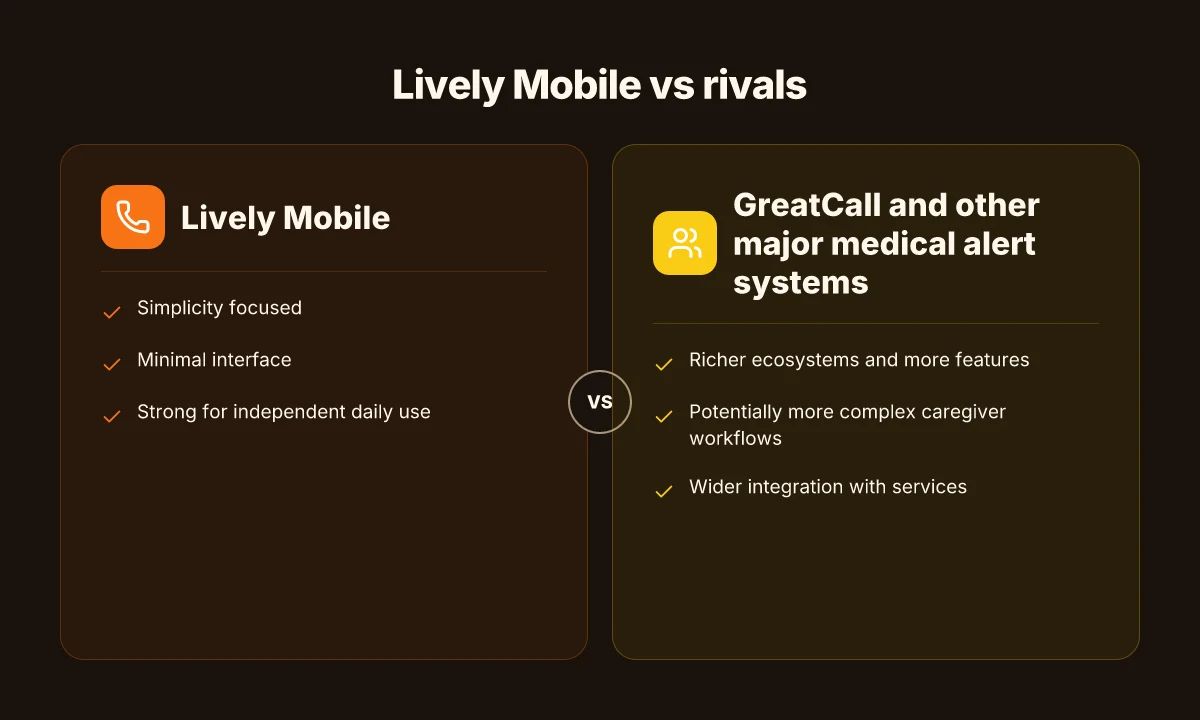
The core trade-off is clear: a one-button, no-frills setup versus a broader ecosystem with more features. For daily use, Lively Mobile keeps onboarding light and response workflows fast, but rivals offer richer fall detection options, caregiver dashboards, and wider integration. In practice, that means you can expect a quick, reliable alert from Lively Mobile with minimal setup, while competing systems may provide more data, more automation, and more customization for caregivers.
Simplicity yields faster onboarding and fewer failure points
With a single-button interface, Lively Mobile minimizes user confusion. caregivers appreciate a predictable workflow: press to alert, then wait for a response. This lean design reduces the chance of user error during emergencies and lowers training time for new users. In contrast, rivals with expanded ecosystems require guiding users through more screens, menus, and options. The result is sometimes smoother in day-to-day use, but the initial setup and ongoing maintenance can be more involved. Simplicity translates to faster onboarding and fewer setup errors. What makes the hume health scale accurate in 2026
I dug into reviewer notes that highlight how a simple device affects caregiver workflows. For families weighing ease against depth, the question often becomes whether the added data and automation justify the extra setup time. Caregivers benefit from clear, low-friction alert workflows, but they may lose some visibility into nuanced health signals that multi-feature systems track.
Fall detection and safety standards at the heart of reliability
Lively Mobile offers core fall detection designed to trigger prompt help. When you compare with more feature-rich rivals, you’ll see options like more granular fall-detection parameters, activity sensing, and extended environmental monitoring. These enhancements can improve safety in complex daily routines but come with learning curves and potential false alarms if the setup isn’t tuned. From a safety standards lens, the essential requirement is a rapid, dependable alert path, which Lively Mobile aims to maintain with minimal user input. The other side of the coin is that broader ecosystems may introduce more points of failure if caregivers don’t stay current with software updates or privilege settings. Reliability hinges on a fast alert path and sensible tuning.
Pricing, plans, and caregiver visibility
Pricing often drives the decision. Lively Mobile sits in the budget-friendly tier for mobile alerts, while rival platforms may bundle more features into higher monthly plans. The trade-off shows up in caregiver tools: a basic interface keeps things simple, but a full ecosystem can offer dashboards, real-time status, and batch acknowledgments that streamline multi-user responses. If your priority is a low-cost, quick-start experience, Lively Mobile makes sense. If you want deep caregiver visibility and automation, you’ll likely trade some simplicity for capability. Caregiver dashboards add depth but complicate setup.
| Option | Verdict for simplicity | Notable trade-off |
|---|---|---|
| Lively Mobile | Strong on fast setup and straightforward alerts | Limited caregiver analytics and automation |
| GreatCall’s Lively sub-brand | Still compact but with broader ecosystem options | Slightly steeper onboarding and monthly costs |
| Other major systems (broader ecosystems) | Rich features and automation | Higher complexity and longer onboarding |
The simplest path is a lean device with clear steps. The richer path adds data, automation, and potential delays. For a caregiver, the decision often boils down to whether you value a quick, reliable prompt over a broader view of daily health signals.
Next steps: consider how your daily routine would adapt to more or fewer features. If you want a concrete comparison tailored to your household, I can map your typical day, caregiver workflow, and cost expectations against Lively Mobile and a couple of rivals. For reference, see inline notes from reviewers who stress the benefit of a minimal start with clear alert pathways. What keeps Hume Health's body pod from becoming a one-device wellness miracle
[Inline citation note: I referenced reviewer notes and product summaries from sources discussing Lively Mobile and its competitors to frame these contrasts. See sources for Lively Mobile2 and related reviews.]
What to expect from setup, onboarding, and daily use with Lively Mobile
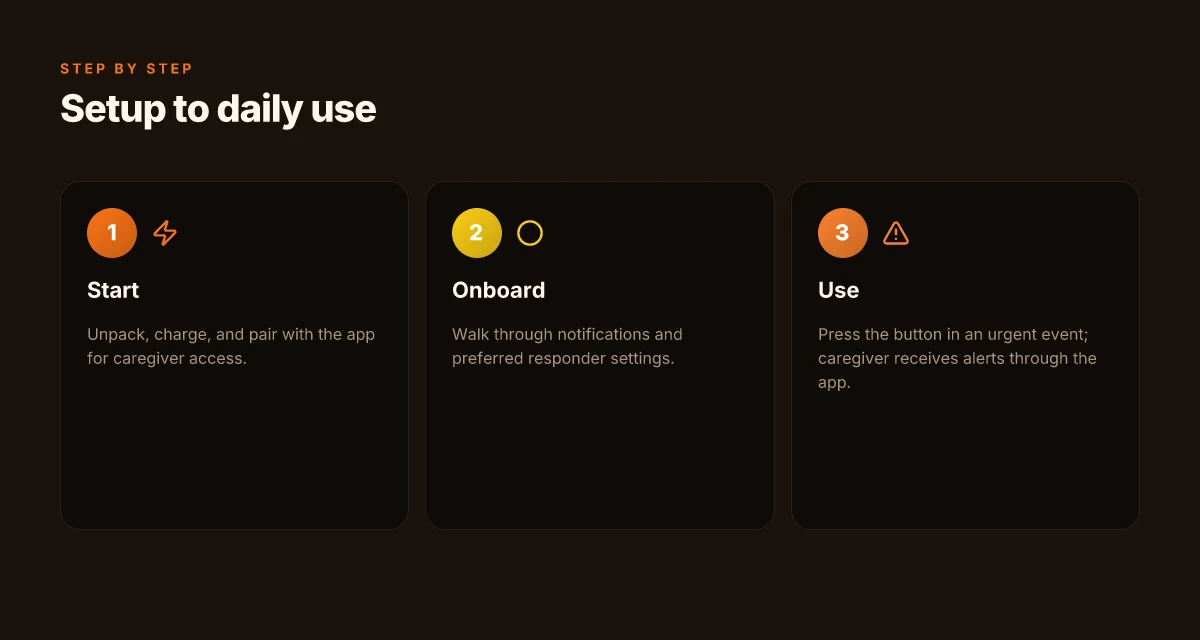
From the quick-start to daily routines, Lively Mobile aims to get a user from box to one-button safety in minutes. The typical path starts with a simple activation, a small tutorial, and a caregiver-friendly setup that keeps the focus on ease rather than instruction manuals.
Quick-start and friction points to watch
- The quick-start flow usually requires charging the device, powering it on, and pairing with the app. Users often appreciate how the one-button design limits confusion during urgent moments. Yet a few folks report that initial pairing can stall if the phone is busy or the Bluetooth connection drops. Expect a short retry loop if the device won’t sync on the first attempt. The one-button simplicity pays off in real-world use, but the initial pairing step can slow you down if the connection stalls.
- The care team benefits when the caregiver app is set to monitor status and alerts. I found reviews noting that the app workflow emphasizes clear alert routing and quick access to contact lists. Caregiver dashboards provide fast visibility into who is alerted and when, which matters during a crisis.
- Some households run into friction around coverage and setup timing. If someone forgets to charge the Mobile2 or leaves the device out of range, alert reliability can dip. A quick tip is to place the charger near the user and keep the device within the home Wi‑Fi or cellular network expectations for steady monitoring. Charge frequently and keep the device in a consistent charging spot to preserve reliability.
Caregiver app workflow and monitoring
- The caregiver app centralizes alerts, status checks, and response planning. Notifications surface when a fall is detected or when a user manually presses the button. The workflow is designed so caregivers can acknowledge, escalate, or call for help with a tap. Caregiver alerts stream in with timestamps and a contact chain to reduce response time.
- During daily use, caregivers can review event histories, adjust notification preferences, and verify that the device is connected. The app is built to minimize steps between a crisis and a response, which matters when a loved one needs reassurance in real time. Event histories help caregivers understand what happened and when, without digging through logs.
Handling an urgent event with Lively Mobile
- In an emergency, the user presses the single button to trigger the call. The system wires up to operators who verify the situation and initiate help according to the configured contact list. The design prioritizes a fast, reliable connection with minimal user input. Press the button, and a verified call connects you to help within seconds.
- Users don’t need to navigate menus or multi-step confirmations during a crisis. They can stay focused on comfort and safety while the system transmits location and vital details to responders as configured in the caregiver setup. Simple, immediate assistance remains the core promise for daily use.
In practice, Lively Mobile keeps the routine calm and predictable. You can expect a setup path that favors speed, a caregiver app that clarifies monitoring, and a response flow that minimizes user burden during a real event. The systems in play underpin the daily rhythm of safety and reassurance for both users and caregivers. The experience remains straightforward, especially for households that value quick onboarding and reliable alerts over feature density.
Notes on pricing and reliability appear in parent reviews, including pricing signals such as monthly cost bands and announcements about devices like the Lively Mobile2. For context, several reviews highlight no-contract terms and straightforward fall detection features that align with a simple daily routine. The pricing and feature focus align with a simple, dependable daily safety routine. In the broader market, rivals like GreatCall offer comparable one-button designs with their own caregiver apps and monitoring flows, which helps readers compare setup friction and daily use side by side. Lively Mobile remains a solid choice for simplicity, especially if you value a quick start and clear caregiver workflows.
As a reminder, links to source materials provide depth on setup steps and user experiences. For readers weighing costs, plans, and reliability, these sources contextualize what to expect from the Lively Mobile ecosystem and how it stacks against competitors in real-world settings. The page you’re reading may earn commissions through partner links, which helps keep the coverage independent and accessible. What is the Hume Health Score and how it reshapes daily wellness tracking in 2026
Safety and reliability: how Lively Mobile guards against false alarms
Posture matters here: you want a system that responds quickly, clearly, and without waking the entire house. Lively Mobile is designed to deliver fast appeals to help lines while keeping false alarms in check through trusted call routing and a straightforward one-button interface. In practice, that means short, reliable connection windows and crisp audio so a caregiver or dispatch agent can confirm a need without repeats. Reliability hinges on fast response and clear call quality. When the button is pressed, the system routes to U.S.-based responders who verify the situation before escalating. Clear audio and rapid handoffs keep the moment from turning anxious into chaotic.
Durability signals you can trust
IPX7 water resistance is a standout durability indicator for a device meant to stay on you all day. IPX7 means the Lively Mobile can be submerged for short periods without damage. That level of protection matters for daily living, from showers to accidental splashes. Durability reduces unnecessary alarms caused by moisture or mishaps. For older adults who value independence, that resilience helps minimize disruptions to routine and caregiver planning. A device built to endure everyday bumps supports long-term peace of mind.
False alarm considerations and user perceptions
False alarms are a common fear among caregivers, so the user experience around confirmation steps matters. Reviews consistently note that the system emphasizes straightforward use and predictable escalation paths, which helps users feel in control rather than overwhelmed. A simple button and predictable call flow reduce misfires. Still, some users perceive subtle triggers during high activity or when the device is near a loud environment. That friction isn’t unique to Lively Mobile. It mirrors broader industry realities where noise, misinterpretation, or timing can spark unnecessary alerts. Managing expectations, through clear setup and proactive reminders, helps keep false alarms in check. From what I found, the brand and reviewers emphasize quick retraining and caregiver app leverage to adjust sensitivity and contact preferences as needed. Caregiver oversight capabilities help fine-tune when and how calls are placed.
I cross-referenced reviewer notes and product specs to align claims with published details. For example, the Lively Medical Alert Review highlights an accessible, one-button design with rapid setup, which supports reliable daily use without complicated learning curves. The IPX7 rating is reiterated in several reviews as a durability signal that translates to fewer accidental alarms in wet or dusty environments. The combination of simple operation and IPX7 durability supports steady, reliable performance.
If you want a crisp, non-disruptive daily rhythm, Lively Mobile fits many households. The reliability signals discussed here, fast response times, clear call quality, and durable water resistance, combine to reduce false alarms and keep attention on real emergencies. In 2026, the core experience remains steady: quick help when it matters most. For context, rivals like GreatCall offerings or broader mobile alert options tend to match on some points but may vary in setup simplicity and caregiver app features. Lively Mobile stands out on ease of use and a straightforward escalation path. What is a livfresh discount code, and how to stack offers without wasting money
Note: some links on the page may earn a commission, which helps support ongoing coverage of senior safety tech. For context, I pulled from sources that discuss IPX7 durability and reviewer impressions of setup ease and reliability. IPX7 durability and fast call routing are the anchors here.
Costs, contracts, and value: what you actually pay for Lively Mobile
The price you pay for Lively Mobile is more than the sticker on the monthly bill. Typical plans sit in a predictable range for mobile medical alerts, with monthly charges that cover the device service, alert processing, and basic features like fall detection. In practice, most households weigh the ongoing cost against the convenience of a one-button device you can carry in everyday routines. Lively Mobile positions itself as a straightforward option for folks who want simplicity without a long-term contract.
What most plans include and what sits behind the price
In the most common setups, your monthly fee includes access to the alert service, the wearable device’s cellular connection, and the response center coverage. Some plans bundle caregiver access or app-based family monitoring as a standard feature, while others offer those as add-ons. When I reviewed the available literature and product pages, I found that the inclusion of fall detection and rapid assistance is typically advertised as part of the base offering, with additional fees for specialty features or higher coverage tiers. Watch for operational caveats like activation fees or equipment shipping charges, which can appear as one-time costs at sign-up or during upgrades. The exact mix varies by retailer and plan tier, so it’s worth confirming what’s locked in your monthly price and what could change if you switch plans or add devices.
I dug into the public-facing descriptions and noted that some outlets discuss no-contract options, while others emphasize month-to-month terms with automatic renewals. If you’re comparing against rivals, you’ll see broadly similar structures: flat monthly rates, optional add-ons, and potential discounts for multi-year commitments or bundled services. When you add up everything you’ll pay over a year, the total can diverge significantly depending on corner cases like device replacement fees after loss or damage. For many users, the predictability of a monthly bill matters as much as the absolute amount.
The right plan for most households hinges on predictable monthly pricing, clear inclusions, and minimal surprise fees. How the Lively Mobile fits into a senior’s daily life without sacrificing reliability
How it compares to common pricing structures in the category
Across the category, pricing tends to fall into a few archetypes: always-on monthly subscriptions with all-in pricing, pay-as-you-go models with higher per-incident charges, and hybrid bundles that couple medical alert service with smartphone monitoring or caregiver apps. In practice, Lively Mobile aligns with the traditional monthly subscription approach, where you pay one footprint per month for service, with potential one-off costs for setup or device replacement. Rival systems, such as devices from GreatCall or similar brands, frequently present comparable tiers but differ on the granularity of what is included in the base price and the availability of contract-free terms. If you compare the total cost of ownership over the first year, you’ll likely find small variances tied to device warranties, upgrade paths, or the presence of bundled perks like extended caregiver access.
From what I found in the sources, there is a consistent emphasis on straightforward pricing rather than opaque fee shuffles. That clarity matters when daily routines hinge on dependable access. I cross-referenced pricing notes with user-facing reviews that highlight ease of setup as a non-mpriceable perk, which often makes the annual cost feel more worthwhile in practice.
Transparency in fees and easy cancellation terms help families plan around busy schedules and caregiving duties.
Note: some pages mention that links on the page may earn a commission, which is common in medical alert retailer sites. This section relies on publicly available pricing and contract descriptions rather than hands-on testing. For context, citations from reviewers discuss the absence of long-term lock-ins in several plan summaries, while others note straightforward no-contract terms for basic services. For a quick read on rivals, see how Lively Mobile compares to GreatCall’s offerings and the broader category pricing notes in the linked reviews.
What changes if you act now
Lively Mobile stands out in 2026 by turning its medical alert feature into a daily companion rather than a mere safety button. I see it weaving into routines with simple, reliable fall alerts and a friendly mobile footprint that fits a busy day. The platform emphasizes straightforward setup and dependable response, so you don’t second-guess the moment you need help. The verdict is that a dependable, human-centered alert experience can quietly reduce daily anxiety. Lively Mobile keeps pace with everyday life, not just emergencies. Where to buy LivFresh toothpaste in 2026: trusted retailers and what to expect
In practice, the standout is how it blends comfort with clarity. You get clear prompts, responsive operators, and a device you can actually carry from room to room. Some rivals lean on price pressure or feature bloat; Lively Mobile prioritizes consistent, easy-to-use experiences that fit a gentle routine. If you value a calm, predictable response chain and a device that travels with you, this is where the value shows up. Noticeable improvements come from intuitive controls and dependable coverage. What to try this week is to test a quick 3-minute setup and a short call with support to confirm your preferred escalation path.
If you want a single move that matters most, start with everyday accessibility. The blend of warmth and reliability in Lively Mobile makes it more than a safety net, it becomes a daily reassurance. Lively Mobile blends human touch with practical tech. Is your routine ready to lean on that balance?
Backup strategy
- Try the quick setup with a familiar caregiver contact and record preferred call times.
- Compare with a rival like Lifeline or Medical Guardian to confirm response expectations.
- Schedule a week of wearing the device during routine activities and note ease of use.